Find the optimal replacement interval
Before you start: A fitted life model, and the cost of a planned replacement versus an unplanned failure.
This is the calculation that turns a reliability model into a maintenance decision, and it answers a question every maintenance planner has argued about: how often should we change this thing out?
Replace too often and you're throwing away good life and paying for outages you didn't need. Replace too rarely and you're paying for failures — which cost more, because they happen at the worst possible moment and take other things with them. Somewhere between those is a minimum, and if you know the life distribution and the two costs, you can find it rather than argue about it.
What you need
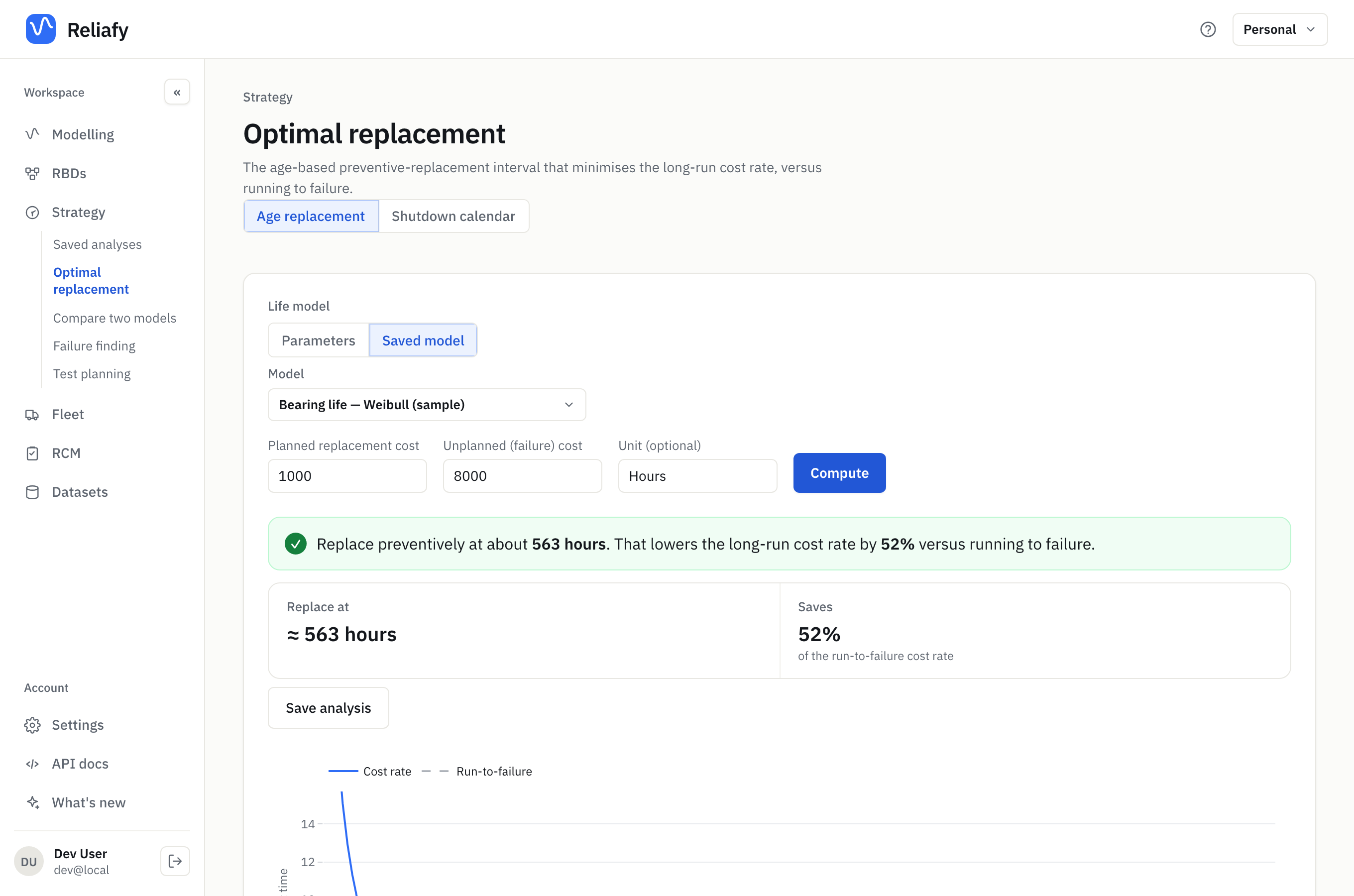
Go to Strategy → Optimal replacement, or press Find a replacement interval under Use this model on a saved model's page. It opens on Saved model with that model (or the one you used last) chosen and its time unit filled in; pick another, or choose Parameters to type a distribution's parameters. Then supply two numbers:
- Planned replacement cost — what it costs to change the component out on your terms, during a planned window.
- Unplanned (failure) cost — what it costs when it fails in service.
The absolute values matter less than the ratio between them. A 10:1 ratio pushes toward frequent preventive replacement; a 1.5:1 ratio means failures barely cost more than planned changes, so there's little to gain by pre-empting them.
Be honest about the unplanned figure. It isn't just the part and the labour — it's the lost production, the collateral damage, the callout at 3am, the expedited freight, and the safety exposure. Most people undercount it dramatically, and that single number moves the answer more than anything else on the page.
The result, and when there isn't one
Reliafy computes the long-run cost rate across candidate intervals and finds the minimum — the interval at which the cost per unit time is lowest — and compares it against the cost of simply running the component to failure.
For the sample bearing model (Weibull, β = 2.5), a planned replacement at 1,000 and a failure at 8,000 give: replace preventively at about 563 hours, which lowers the long-run cost rate by 52% against running to failure. The chart shows the cost rate at every replacement age, with the run-to-failure cost as a line to beat.
Sometimes the honest answer is don't replace preventively at all, and the tool will tell you so. That happens whenever the component isn't wearing out. If your Weibull β is around 1, the failure rate is constant: a new unit is exactly as likely to fail as an old one, so swapping a working component for a fresh one buys you nothing and costs you a replacement. If β is below 1, scheduled replacement is actively harmful — you'd be removing survivors and installing the riskiest units you have.
This is why the fitted model matters so much here. Preventive replacement only pays when there's wear-out to pre-empt, and the shape parameter is what tells you whether there is. A schedule set by habit or by a vendor's default interval has no way of knowing.
When replacing is cheaper at a shutdown
Plain age replacement assumes a planned change costs the same on any day. Often it doesn't. On a plant with a shutdown every six months, changing a part while the plant is down anyway costs little; stopping the plant between shuts to do it costs more. So the real question becomes: at each shut, is this part old enough to change now, or will it last to the next one?
That's the Shutdown calendar mode. On Strategy → Optimal replacement, switch the Replacement mode from Age replacement to Shutdown calendar, then give it:
- Life model — a saved model, or Parameters to type a distribution, and the Model time unit (days, weeks, months, …), so the shut dates can be turned into model time.
- Shuts — each with what Replacing at it costs and when it comes: every so often (Repeats) or On dates you list. Add a shut for a second kind, such as a weekly stop as well as an annual turnaround.
- Failure (unplanned) cost — what a failure costs.
- Replacing between shuts costs — what a planned change on an ordinary day costs. Leave it blank if you'd never do that.
Today is time 0, and the dates follow from it.
A worked example
A part whose life follows a Weibull distribution with α = 365 days and β = 2 (it wears out). The plant shuts every 180 days, and changing the part at a shut costs 100. A failure costs 400, and a planned change between shuts costs 150. Press Compute:
At the Shutdown: replace the part if it is older than 138 days. Long-run cost about 362 a year, 20% less than running to failure, 11% less than plain age replacement.
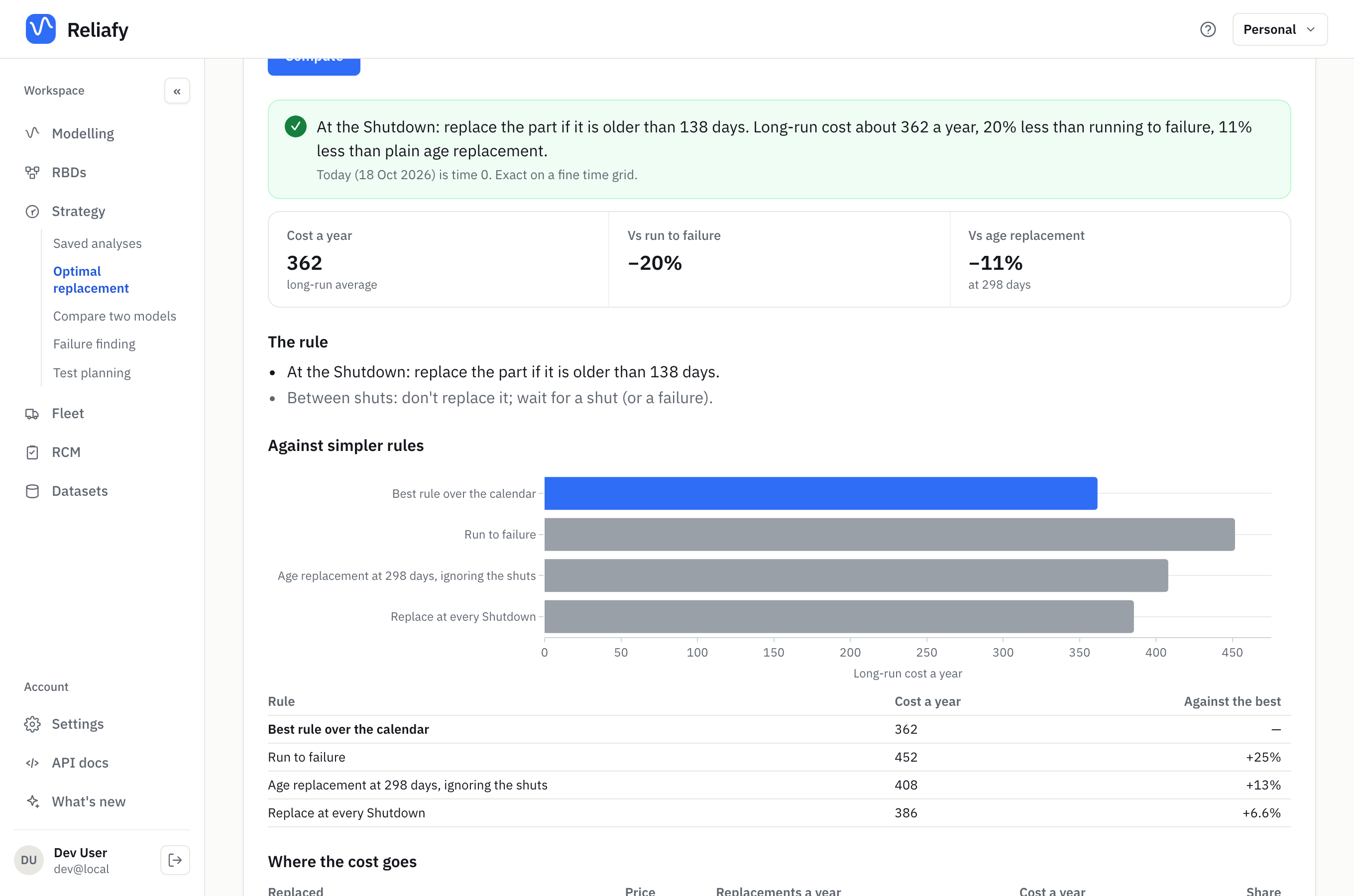
So the rule is simple to run on the floor: at each shut, change the part if it has been in for more than 138 days, and leave it otherwise. It never pays to stop the plant just to change it. Against simpler rules shows what the alternatives cost: changing it at every shut whatever its age costs about 7% more, and age replacement at 298 days, ignoring the shuts, about 13% more. Where the cost goes splits the yearly cost between shut changes and failures, and the schedule below it lists the coming shuts by date with the chance that each one will need a change.
One unit now answers the question for the part in service today. Enter its age and Reliafy compares replacing it now, at the next shut, or later.
The exact methods are free. For calendars whose pattern takes a very long time to repeat, Method and limits offers a sampled method (Pro).
Where to go next
If the component is inspected rather than replaced on a schedule — you're looking for a hidden failure rather than pre-empting a visible one — the failure-finding interval calculator under Strategy is the right tool instead: see setting a failure-finding interval.
If you want to know how many failures to expect across a fleet over the next year, rather than when to replace one item, that's fleet forecasting.
And if you're deciding among several candidate policies, save each analysis — Reliafy keeps them under Strategy so you can compare and cite them later, which matters when someone asks in six months why the interval is what it is. An RCM study can cite a saved analysis as the evidence for a failure mode's maintenance task: see running an RCM study.