Model a mission in phases
Before you start: A non-repairable diagram with life models on its blocks, and the mission's stages with their durations.
Many missions don't need everything all the time. An aircraft needs its landing gear to take off and land, but not in the cruise. A batch reactor needs its heater only to warm up. A standby generator needs its starter only to start.
A phased mission splits the mission into stages, each with its own duration and its own idea of "working". The catch is that the equipment carries its history from one phase to the next. A unit that fails while it isn't needed is still broken when the next phase needs it. So you can't just multiply the phases' reliabilities together: Reliafy works the mission through in order.
This guide uses a short flight: an engine, two hydraulic pumps and the landing gear.
Set up the phases
Phases belong to a non-repairable diagram. Open it from RBDs, open the ⋯ menu at the right of the toolbar and choose Phased mission….
For each phase, give a Name and a Duration in the diagram's unit. Add phase adds the next one, and the arrows reorder them. Open a phase's summary line to say what it needs:
- Blocks needed in this phase: every block is needed unless you click it off. A block that isn't needed is struck through.
- Working inputs needed for each voting node: how many of its inputs must work in this phase. Leave it blank to use the node's own setting.
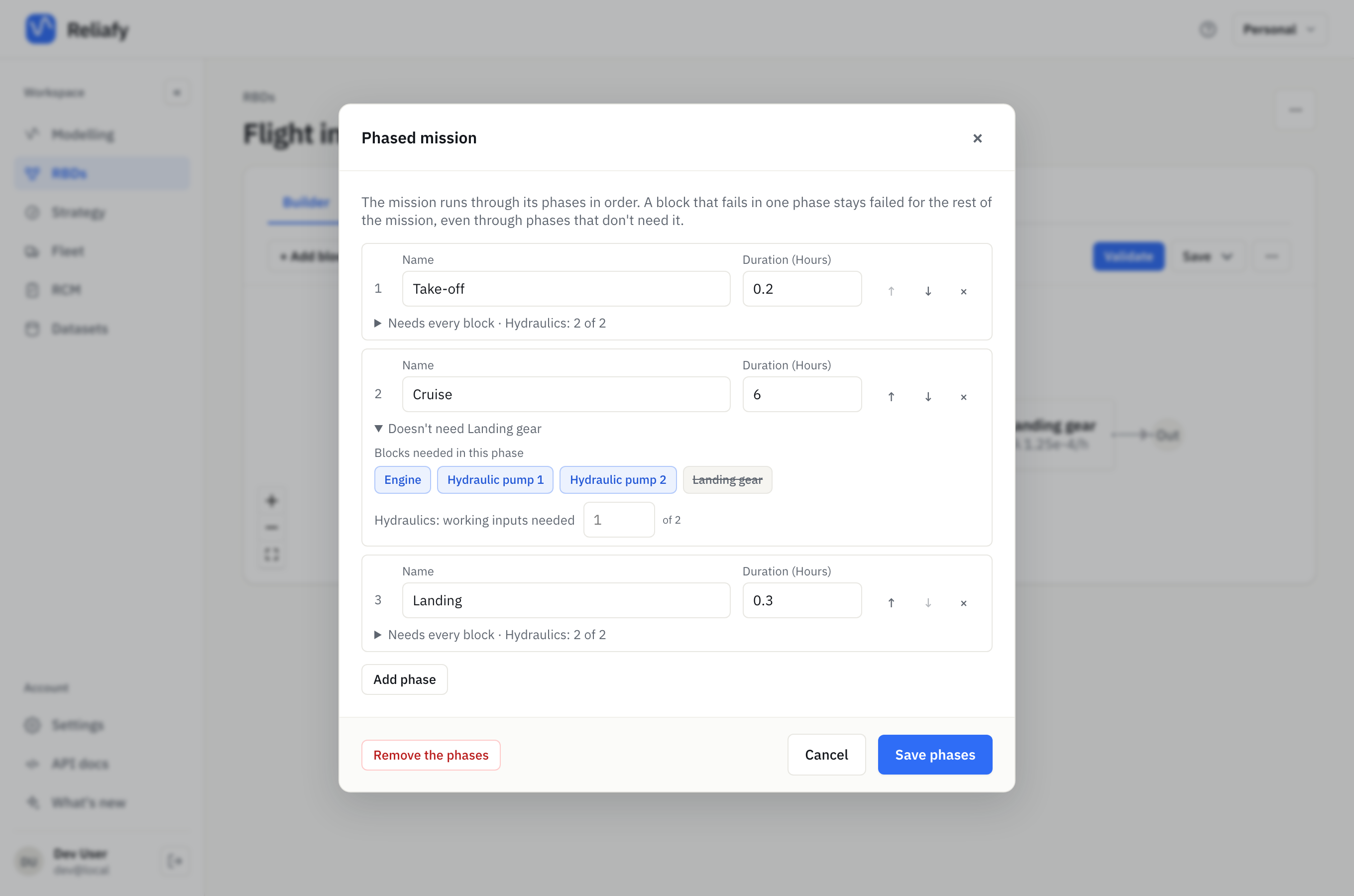
The flight has three phases:
| Phase | Duration | What it needs |
|---|---|---|
| Take-off | 0.2 hours | every block, and both hydraulic pumps |
| Cruise | 6 hours | not the landing gear; one hydraulic pump of two |
| Landing | 0.3 hours | every block, and both hydraulic pumps |
The two pumps feed a voting node called Hydraulics, drawn as one of two. Take-off and landing set it to 2 of 2.
Press Save phases, then save the diagram. The ⋯ menu now shows Phased mission… ✓. Remove the phases in the same dialog takes them off again.
Read the result
Validate the diagram and press Calculate on the Calculator tab. The diagram's usual results come first. The Phased mission section follows them.
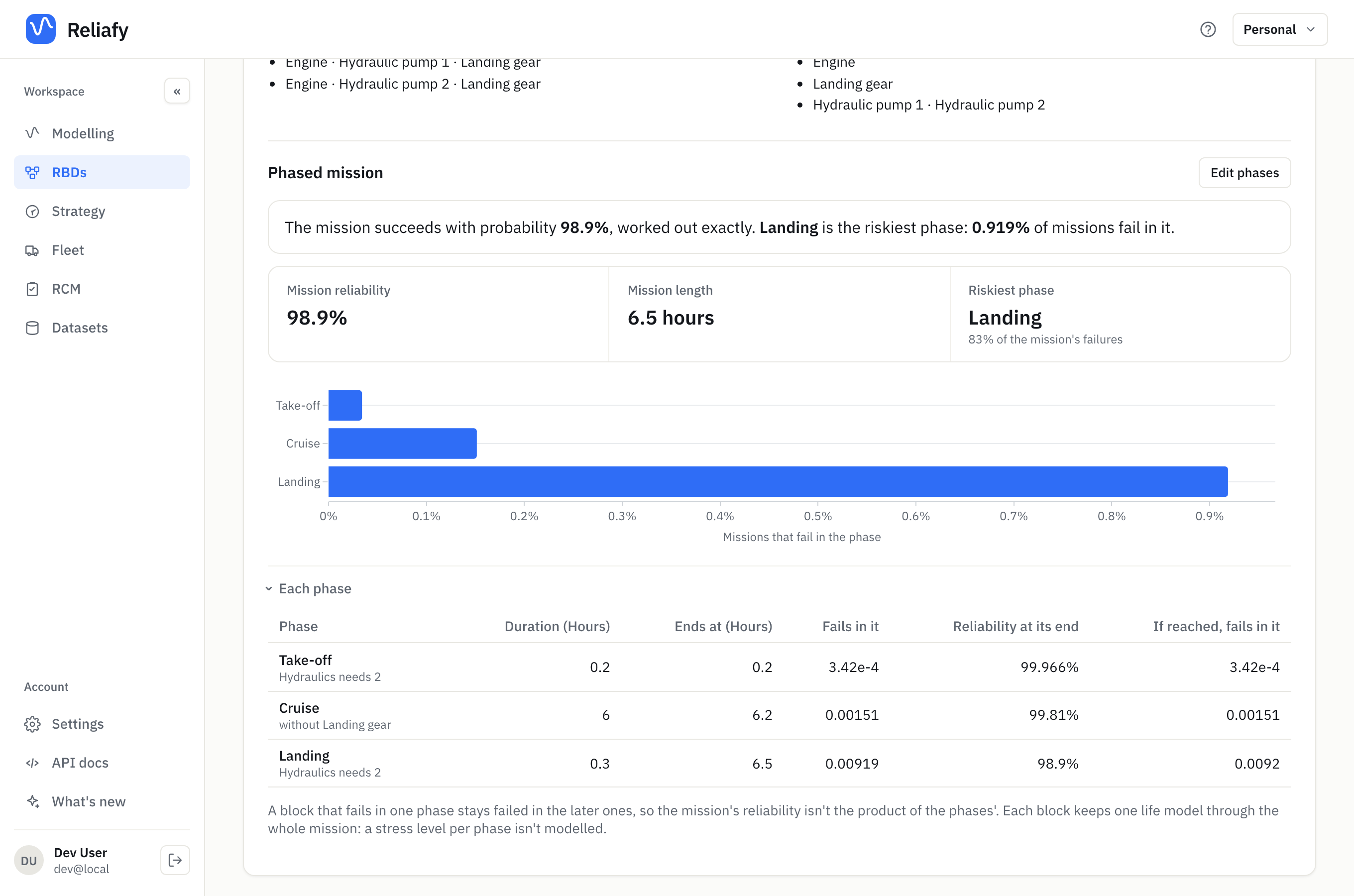
The flight succeeds with probability 98.9%, worked out exactly. The riskiest phase is landing: 0.919% of flights fail in it, 83% of all the failures, even though it is the shortest phase.
That's the history at work. A hydraulic pump that fails during the six-hour cruise doesn't matter then, because one pump is enough. But the landing needs both, so that failure shows up at landing. The chart, Missions that fail in the phase, makes the point: put the effort where the failures show up, which is not always where they happen.
Each phase gives, for every phase, the chance the mission fails in it (Fails in it), the Reliability at its end, and If reached, fails in it: of the missions that get that far, the share that fail there.
When the mission can't be worked out exactly, it is simulated, and the answer says so and gives a 95% interval. Edit phases reopens the editor.
Limits
- Phases apply to non-repairable diagrams only. In a repairable diagram failed blocks are repaired, which a phased mission doesn't model, and the menu item isn't offered.
- Each block keeps one life model for the whole mission. A higher stress in one phase (a harder take-off, say) isn't modelled.
- A network diagram ignores its phases.
How it works
For each phase, Reliafy builds the structure that phase needs and asks: given the blocks' states at the end of the last phase, what is the chance the system works throughout this one? Because failures carry forward, the mission reliability is the probability that every phase's structure holds at once, over its own time window. It is not the product of the phases' own reliabilities.
Where to go next
- Build a reliability block diagram covers voting nodes and the other block types.
- Set a system target and design to meet it works out what each block needs for a target.