Check a maintenance plan against its evidence
Before you start: A plan to check (tasks and intervals), and your failure data for the equipment, fitted as a non-repairable model. Saved optimal-replacement analyses are what the interval check reads.
Most maintenance plans carry intervals that were right once: a maker's recommendation, an audit, "what we've always done". This guide checks each interval against what your own failures say, then helps you decide, task by task, whether to keep it, change it, or note why it stays.
The check is only a comparison. For each fixed-interval task it reads the cheapest replacement age that your failure data support, and says whether your interval is close to it, far shorter or far longer. Nothing is changed for you.
Put the plan in a study
Work in an RCM study: one study for the system the plan covers. For each task in the plan, add the failure mode it guards against (a function and a functional failure above it, if you don't have them, can be one line each: Run the line, The line stops). Give each failure mode a decision of Fixed-interval replacement, name the task, and enter its Interval and unit exactly as the plan has them. One row per task keeps the check clear.
The study opens on its Worksheet, and saves when you press Save study. A study takes its plan row by row: it has no file import, so for a long plan work down your list in order.
Back each task with evidence
A fixed-interval decision expects a saved optimal-replacement analysis. It is the working of the cheapest age to replace, from your failure data, the cost of a planned replacement and the cost of a failure.
- Fit a non-repairable model to the failures of that equipment. Use every unit of the same kind, not only one.
- Run optimal replacement with the model and your two costs, and press Save analysis.
- In the study, click the failure mode's Decision (To decide, or Change the decision… in its details), keep Fixed-interval replacement, and under the evidence pick the saved analysis. Use the same unit as the analysis: if they disagree, the check says inconclusive rather than convert. Press Apply, then Save study.
Tasks with no data yet can stay unlinked: they show a quiet dash, not a warning, because a decision made from judgement is not wrong, only unevidenced.
Read the interval check
Each linked decision's Evidence check reads one of these:
- Supported: your interval is within a factor of two of the cost-optimal one, so the data and the plan agree.
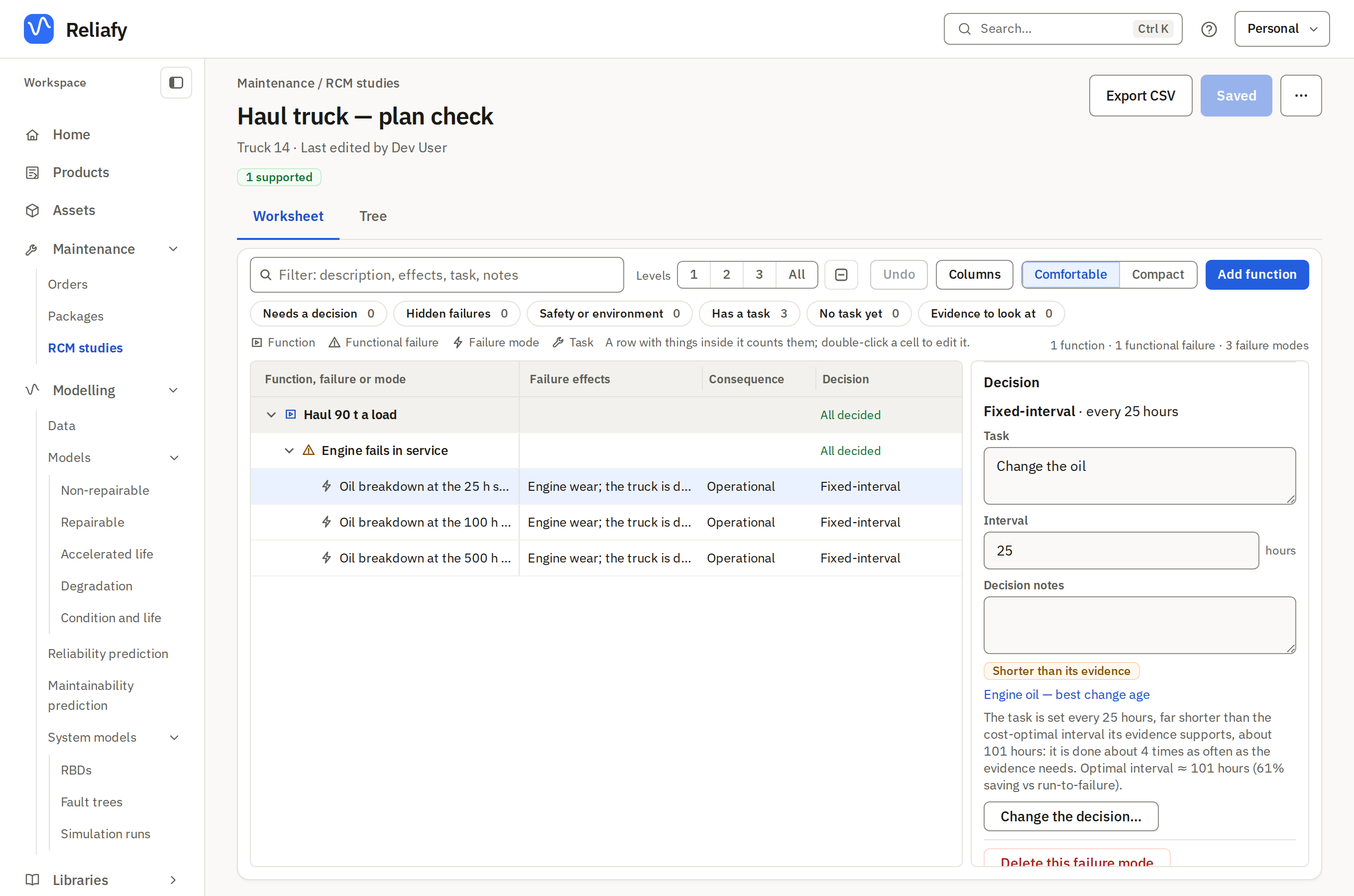
- Shorter than its evidence: the interval is less than half the cost-optimal one.
- Longer than its evidence: the interval is more than twice it.
The line under the check gives both numbers and how far apart they are:
The task is set every 25 hours, far shorter than the cost-optimal interval its evidence supports, about 101 hours: it is done about 4 times as often as the evidence needs.
A task set too short is replaced while it still has most of its life: you pay for planned work you don't need. A task set too long lets failures through that a replacement would have caught. Neither is a verdict. A warranty, a safety margin or a shutdown that only comes round every 12 months can be a good reason for an interval. The check shows the numbers and the decision stays yours.
To find the ones to look at, use the worksheet's filter Show only → Evidence to look at. The chips under the study's title count each status, and the RCM list shows the same counts for every study (interval differs).
Decide what to do
For each task that is flagged, three answers are reasonable.
- Extend it (or shorten it). Change the Interval to near the evidence and save. The check reads the new interval at once, and turns Supported when it is within a factor of two. If your data are thin, move part of the way and check again when there are more failures.
- Keep it, and say why. Write the reason in the decision's Notes (the shutdown is every 12 months, so we replace at it). It stays flagged, which is honest: the data still say the interval differs, and the note says why you accepted that.
- Regroup it. Several tasks that are all flagged, with similar evidence intervals, are often better done together on one visit than at six separate intervals. Move them to a common interval close to what the evidence says for each, and say in the notes which tasks share the visit. Then check that each still reads Supported: a common interval that's far from one task's evidence will flag that task.
It keeps checking
The check runs every time the study opens. Refit the linked model with new failures, or save a new analysis, and the status follows. An interval that was supported last quarter can read Shorter than its evidence this quarter, and the study tells you without you re-running anything.
To give someone the result, Export CSV downloads the worksheet with each decision's evidence and status, or share the study from a team workspace.